⚠️ Ad blocker detected. Running an ad-blocking extension may hide offer titles and descriptions and break links to bookmakers. It is recommended that you disable it or add Matched Betting Blog to your ad blocker's allowlist.
New Try the Bet Builder Buddy to find matching Bet Builder and lay combinations. Includes live odds! ⚡️ Give it a try
The MBB Oddsmatcher helps you quickly find closely matched back and lay bets, making it easier to minimise qualifying losses and maximise your profits from bookmaker offers.
Whether you’re placing your first matched bet or looking for a faster way to find suitable selections, this guide will show you how to get the most from the tool.
Getting started
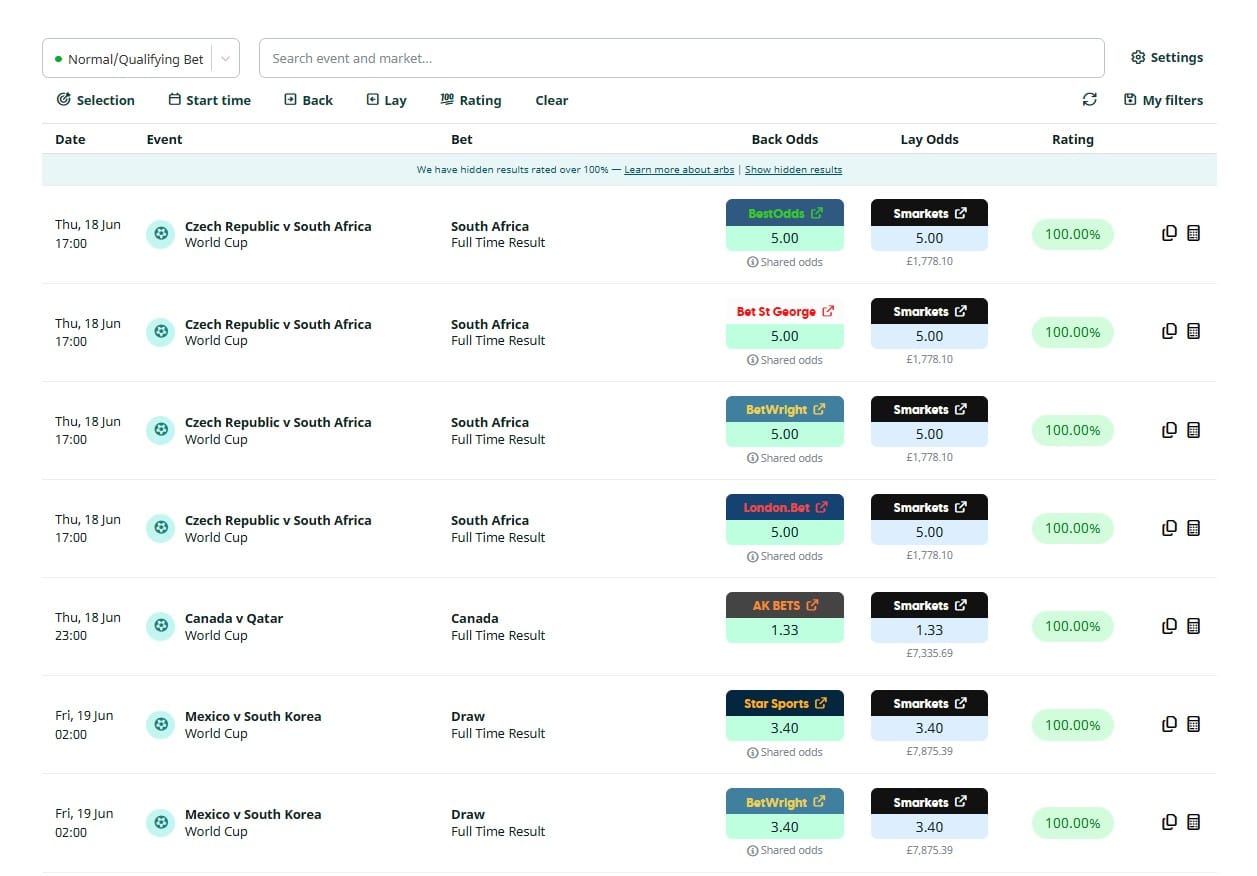
When you open the Oddsmatcher, you’ll see a table of available betting opportunities from bookmakers and exchanges.
Along the top of the page, you’ll find filters, a search box and your tool settings, allowing you to quickly narrow down the results and find bets that meet your requirements.
The results table below is where you’ll find all available matches, along with the bookmaker odds, exchange odds, available liquidity and rating.
By default, arbitrage opportunities (arbs) with ratings above 100% are hidden from the main results table. You can reveal them at any time using the link above the results.
Before jumping straight into the filters, I’d recommend getting familiar with the main results table first. Once you understand what you’re looking at, the filters will make a lot more sense.
Your first qualifying bet
If you’re new to matched betting, follow these simple steps.
Step 1: Find a suitable match
Look for:
A popular sporting event
A strong rating
Sufficient exchange liquidity
Odds that meet any bookmaker promotion requirements
Whilst it may be tempting to choose the highest-rated result available, I’d generally recommend sticking to popular events such as football, horse racing and other major televised sports. They tend to make more natural qualifying bets from a bookmaker’s perspective.
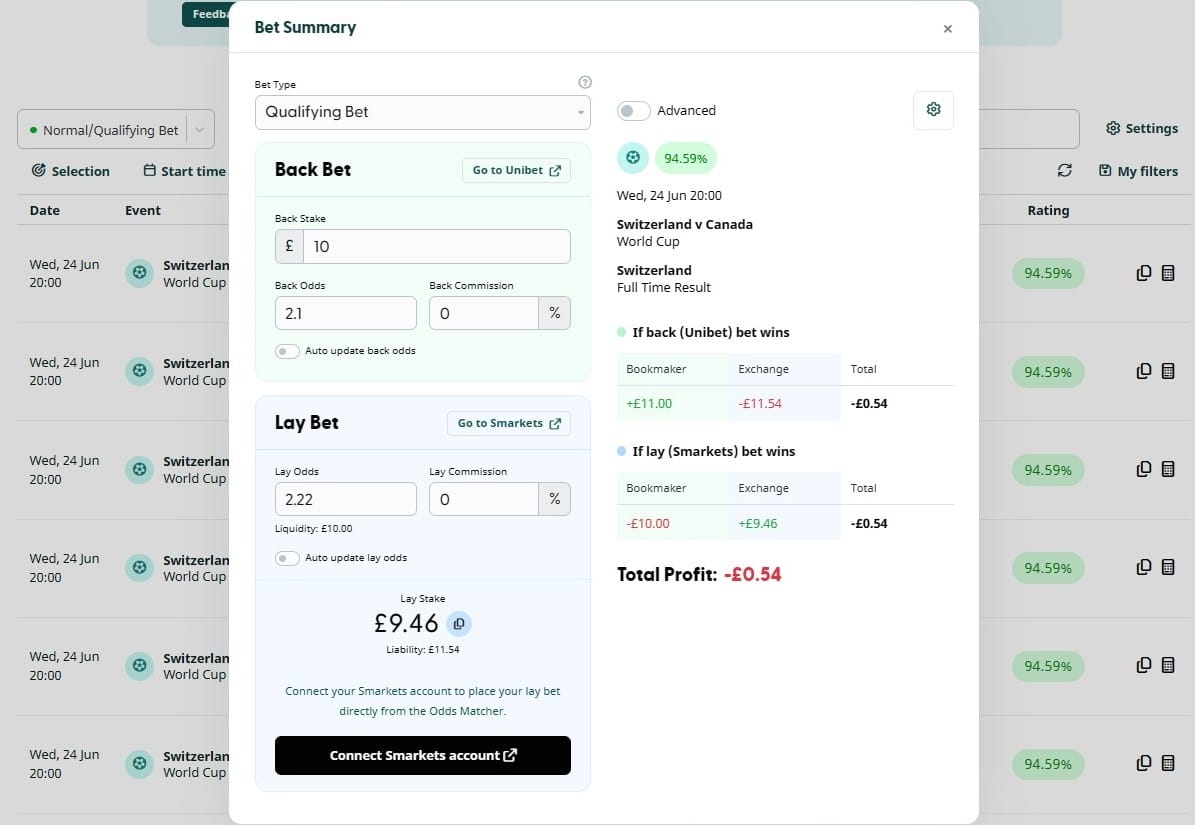
Once you’ve found a suitable match, click the calculator icon on the right-hand side to open the Bet Summary window.
Step 2: Open the Bet Summary
Here you’ll find:
The bookmaker and exchange odds
Your back stake
Your lay stake
Your liability
The expected outcome for each result
We’ll cover each section in more detail over the next few steps.
Step 3: Place your back bet
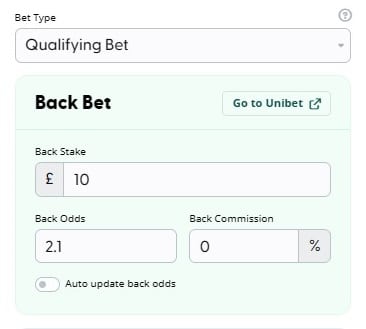
The Back Bet section shows the details you’ll need when placing your bookmaker bet.
You can use the ‘Go to [Bookmaker]’ button to open the relevant bookmaker site (the bookmaker can’t tell that you’re coming from Matched Betting Blog), or navigate there manually if you prefer.
Before placing your bet, make sure:
The odds still match those shown in the Oddsmatcher
Your stake is correct
The event and selection are correct
Once you’re happy everything matches, place your back bet with the bookmaker.
Tip: Odds can change quickly, particularly around kick-off or the start of an event. Always double-check the bookmaker odds before placing your bet.
Step 4: Place your lay bet
Once you’ve placed your back bet, it’s time to place the corresponding lay bet on the exchange.
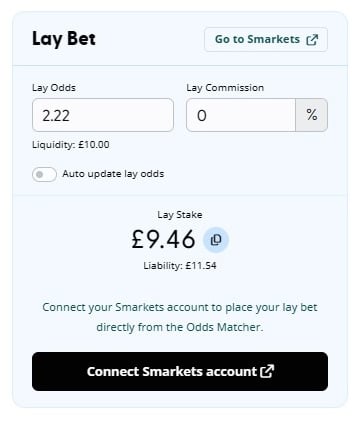
The Lay Bet section shows:
The lay odds you’ll need
Your lay stake
The available exchange liquidity
Your liability
You can use the ‘Go to Smarkets’ or ‘Go to Matchbook’ button to open the exchange manually, or place the lay bet directly from the Oddsmatcher if you’ve connected your Smarkets or Matchbook account.
Before placing your lay bet, make sure:
The lay odds still match those shown in the Oddsmatcher
There is sufficient liquidity available
The lay stake matches the figure shown by the calculator
You can use the copy icon next to the lay stake to quickly copy the figure when entering your lay bet.
Step 5: Confirm your liability
Your liability is the amount you’ll lose on the exchange if your back bet wins.
Always check that the liability shown by the exchange matches the liability shown in the Oddsmatcher.
If the figures don’t match, double-check the odds and stake entered before placing your lay bet.
Don’t worry if your liability is higher than your original stake. This is completely normal and depends on the odds being matched. As long as the liability shown by the exchange matches the liability shown in the Oddsmatcher, you’re good to go.
Understanding the results table
Each row in the results table represents a potential matched betting opportunity. Here’s what each column means:
Date & Time
Shows when the event is scheduled to begin.
Event
The sporting event associated with the selection.
Selection
The outcome you will be backing and laying.
Examples include:
Arsenal
Over 2.5 Goals
Draw
Horse Racing selections
Back Odds
These are the odds available at the bookmaker.
Clicking the bookmaker button takes you directly to the relevant market.
Lay Odds
These are the odds available on the exchange.
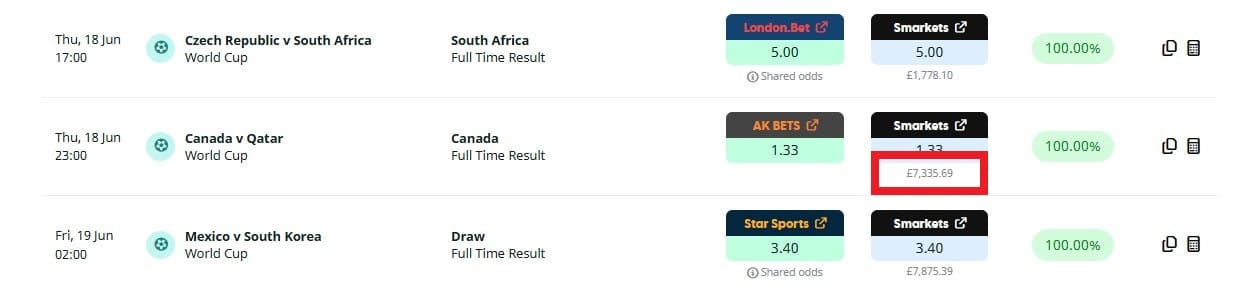
The figure displayed underneath shows the available liquidity.
Rating
The rating indicates how closely the bookmaker and exchange odds match. In general, the higher the rating, the better the match.
Generally speaking:
Higher ratings are preferable
Higher ratings usually result in smaller qualifying losses
Lower ratings usually result in larger qualifying losses
By default, results with ratings over 100% are excluded for account health reasons. See the arbs section for more.
Understanding liquidity
Liquidity is the amount of money currently available to be matched on the exchange.
For example:
£500 liquidity means there is £500 available at those lay odds
£20 liquidity means there is only £20 available
In the Oddsmatcher, the available liquidity is displayed underneath the lay odds.
You should always ensure sufficient liquidity exists before placing your back bet. If there isn’t enough liquidity available, you may not be able to fully place your lay bet at the displayed odds.
Understanding special labels
Arb
Occasionally, you’ll see opportunities marked with an arb label.
An arbitrage (arb) opportunity occurs when the bookmaker odds are better than the exchange odds.
These opportunities can generate a guaranteed profit regardless of the result, even without an associated bookmaker promotion.
It’s important to understand that regularly betting on arbs can be a red flag to bookmakers and may lead to restrictions sooner than you would otherwise receive. You should only take arbs if you understand the risks of doing so.
Because odds can move quickly, always verify the bookmaker and exchange prices before placing any bets. An arb can disappear within seconds if either side changes.
By default, ARBs are hidden from the main results table for account health reasons, but you can reveal them at any time if you wish.
Estimated
The Estimated label indicates that the displayed prices may be less reliable than normal. This can happen for a variety of reasons, such as temporary data issues.
Before placing any bets, always verify that the bookmaker and exchange odds still match the prices shown.
Shared odds
Some bookmakers operate on the same underlying platform and may therefore display identical prices.
These opportunities are identified with a Shared Odds label.
A Shared Odds label indicates that multiple bookmakers may be displaying the same underlying price.
This often happens when several bookmaker brands operate on the same platform or use the same odds provider.
Whilst this isn’t a problem in itself, it does mean you may see the same opportunity appear multiple times in the Oddsmatcher across different bookmakers.
As always, you should double-check the current price before placing a bet.
Unavailable
When an event moves in-play, you will see an ‘unavailable’ label. The Oddsmatcher is only intended for bets placed before the event starts. You may also see this label if we are no longer receiving updates for these odds.
Using filters
The filter panel allows you to narrow down the results and quickly find opportunities that meet your requirements.
Once you’ve created a filter combination you use regularly, you can save it using the ‘My Filters’ feature for quick access in future.
Selection filters
Selection filters allow you to filter by:
Sport
Competition
Event Name
Market
Selection
If your chosen sport, competition or market includes draw selections, you can exclude them using the switch that appears.
This is particularly useful when a promotion requires you to back a team rather than a draw.
Start time filters
Start time filters allow you to focus on events taking place within a specific timeframe.
You can:
Select a predefined time range
Set a custom date range
I generally recommend focusing on events taking place within the next few days. Your bets will settle sooner, allowing you to recycle your bankroll into other offers more quickly.
Back filters
The Back filter allows you to:
Choose specific bookmakers
Set minimum back odds
Set maximum back odds
This is particularly useful when a bookmaker promotion specifies minimum qualifying odds that your bet must meet.
Example: If an offer requires odds of 2.00 or greater, you can filter out all selections below 2.00.
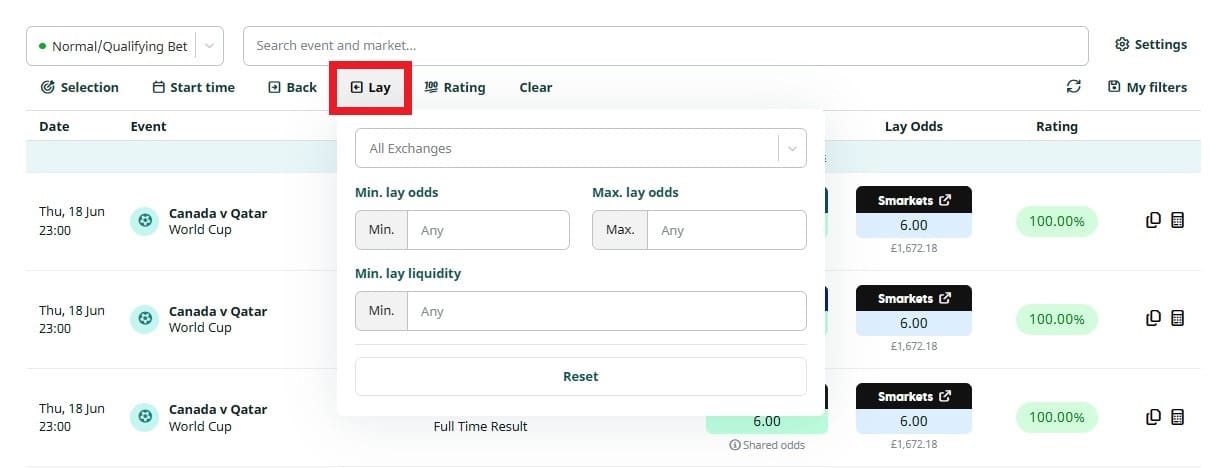
Lay filters
The Lay filter allows you to:
Choose specific exchanges
Set minimum lay odds
Set maximum lay odds
Set minimum liquidity requirements
Many users set a minimum liquidity threshold to avoid opportunities where there isn’t enough money available to fully place the lay bet at the displayed odds.
For example, if your lay stake is £50 but only £20 of liquidity is available, you won’t be able to fully place the lay bet at those odds.
Rating filters
The Rating filter allows you to set minimum and maximum rating thresholds.
This can be useful when searching for stronger qualifying bet opportunities.
For example, if you’re only interested in matches rated 90% or higher, you can filter out anything below that threshold.
By default, opportunities rated above 100% (arbs) are hidden for account health reasons. If you’d like to view them, you can enable the ‘Show arbs’ option within the Rating filter.
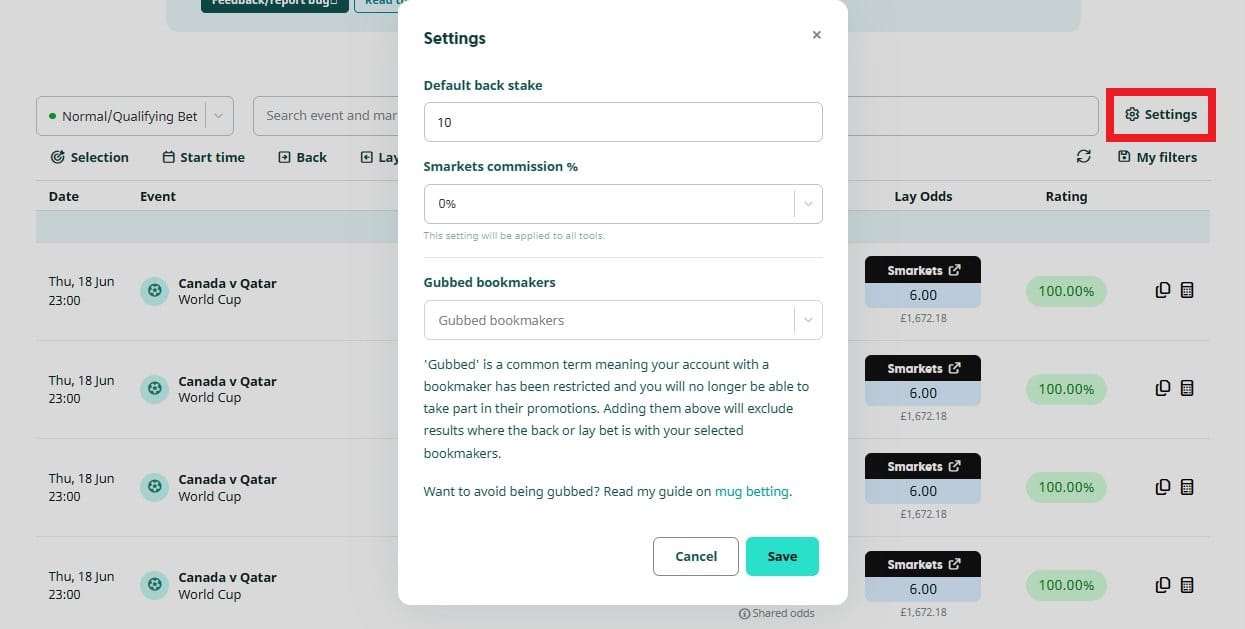
Settings
The Settings menu allows you to configure your preferred defaults.
Default back stake
Enter the stake you most commonly use.
This value will automatically populate within the calculator.
Exchange commission
Enter the commission rate charged by your exchange.
Examples:
Smarkets 0% Offer = 0%
Standard Smarkets Account = 2%
Accurate commission settings ensure all calculations remain correct.
Gubbed bookmakers
If you’ve been restricted by a bookmaker and can no longer take part in their promotions, you can add them here to exclude them from your results.
These exclusions apply across all tools and the Reload Offer page, helping to ensure you’re only shown opportunities that are relevant to you.
Any bookmakers added here will be excluded even if they are selected within an individual tool’s filters.
Tip: If you’re regularly seeing results from bookmakers you can no longer use, adding them here can make your oddsmatcher results much cleaner.
Best practice tips
Don’t always chase the highest rating
A slightly lower-rated match on a major football game is often preferable to a higher-rated match on an obscure event.
Natural betting behaviour can help maintain bookmaker accounts for longer.
Remember, matched betting is about long-term profitability, not squeezing every last penny out of a qualifying bet.
Always check odds before betting
Odds change constantly.
Always verify that the odds shown in the Oddsmatcher match the bookmaker and exchange before placing your bets.
Check liquidity before backing
Never place a back bet without first ensuring there is sufficient exchange liquidity available.
Read promotion terms carefully
Always check:
Minimum odds requirements
Eligible markets
Stake limits
Sport restrictions
Excluded selections
before placing any qualifying bet.
Start with popular sports
Football, horse racing and other major televised events are often the easiest starting point for new matched bettors, with plenty of liquidity and widely available bookmaker markets.
Frequently asked questions
Why is my liability higher than my stake?
It’s completely normal for your liability to be higher than your back stake. The exact liability depends on the lay odds being used.
Why have the odds changed?
Bookmaker and exchange odds move constantly. If either price changes after the opportunity was displayed, the rating, lay stake and expected profit/loss may also change.
Always verify prices before placing your bets.
Why can’t I see any arbs?
Arbs are hidden by default for account health reasons. You can reveal them using the ‘show arbs’ option within the Rating filter.
Why can’t I fully place my lay bet?
There may not be enough exchange liquidity available at the displayed odds. Try reducing your stake or selecting an alternative opportunity.
Do I need to connect my Smarkets or Matchbook account?
No, you can use the Oddsmatcher without connecting either account.
If you prefer, you can manually place your lay bets on Smarkets or Matchbook using the odds and lay stake shown in the Bet Summary.
However, connecting your account allows you to place lay bets directly from the Oddsmatcher, making the process faster and more convenient. You can connect both from your Connected Exchanges page.
If you’ve already connected the exchange (for example, your Smarkets account for the 0% commission offer), you’ll see a Place lay bet button within the Bet Summary. Otherwise, you’ll see a button to connect that account, such as Connect Smarkets account.
Got a question?
Ask the community on Discord, or leave me a comment below. I usually respond within 24 hours.
Matt Kirman – Matched Betting Blogger
Since 2014, I’ve blogged over £100,000 worth of profit, and made it my mission to make matched betting accessible to everyone.








Got a question?
Ask the community on Discord, or leave me a comment below.
I usually respond within 24 hours.
Matt Kirman – Matched Betting Blogger
Since 2014, I’ve blogged over £100,000 worth of profit, and made it my mission to make matched betting accessible to everyone.